10 Slack tricks to express your company culture, increase productivity and create a caring environment
Published November 16, 2023
Easy-to-use and essential for distributed teamwork, the Slack chat-style communication software has become an established tool for information sharing and collaboration in many organizations.
at MAIN, Slack is our main communication tool. we send almost no internal emails. here are 10 tips in the form of commandments to express your company culture, increase your productivity and create a caring environment on Slack!
take the time to get organized
With the flood of potential channels, it's important to have some ground rules for getting organized. The first 6 commandments focus on the things we've done in HAND to find our way around collectively.
1- make a channel naming convention
at MAIN, all our channel names have contextual prefixes(e.g. rh-, équipe-, gestion-). this allows us to quickly classify our channels.
- gestion-gouv-ca
- management-accounting
- pro-team
- team-perso
- management-rh
- management-rh-candidatures-spontaneous
2-try to keep your channel names logical
For example, at MAIN we create channels by project and sometimes even a channel by project component, adding certain suffixes to indicate the nature of the projects (e.g. -dev for a project in development not yet underway, -ext for a channel with collaborators outside the organization).
This helps to quickly set the context of discussions and avoid out-of-context messages.
- a-momentumpi (general momentumPI project channel used to discuss current operations)
- a-momentumpi-idea (specific channel to talk about the inclusion, diversity, equity and accessibility components of the project)
- a-momentumpi-gouv and admin (specific channel to talk about steering committees and administrative aspects of the project)
- a-momentumpi-education-pi (specific channel for educational aspects of the project)
P.S.: The "a-" in the prefix stands for the business unit called "support foracceleration ".
3-document channel headers, you'll be aiming for
channel headers allow you to add themes. this can be a short sentence to explain the purpose of a channel. it's also possible to add documents, external links or links to folders in Google Drive. this is really essential for effective collaboration.
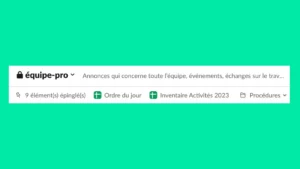
4- in the discussion threads, you answer
if the devil is in the details, you can exorcise him by always replying through the threads! we sometimes forget this, especially with the mobile app whose thread interface isn't as intuitive, yet it's an essential trick for increasing productivity in Slack.
Threads are an easy way to give more context and to write down all the details of an issue. They're a valuable source of information, especially for colleagues who gettagged later on in the discussion.
5- Pin important messages
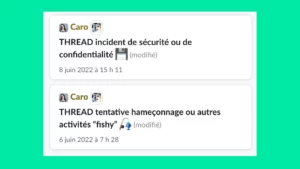
at MAIN, we use a combination of threads and pins to record sub-topics that don't necessarily merit a specific channel, but which may persist over time.
For example, in our #équipe-tech channel, we have a thread for logging phishing attempts that may have escaped our spam filters - cleverly called THREAD phishing attempts or other "fishy" activities 🎣. this allows quick reference by consulting the pinned items in the channel header, and also allows new people joining the channel to quickly find useful contextual information.
6- avoid private discussions
At MAIN, we've chosen to ban all private conversations and encourage all work-related conversations to take place in channels. this practice is the one that generates the most reluctance at first. asking a question that seems insignificant or addressed to just one person in public? strange... it's true that it takes some time to get used to it.
the reality is that many team members will insert themselves into conversations to add their "two cents", even if the conversation wasn't really directed at them!
That said, in a hybrid work environment, we've found that information is often fragmented, and that the only way to get all the pieces of the puzzle is often through these public conversations. This way of doing things replicates the natural tendency in the workplace to catch information on the fly when two colleagues are chatting together. and our projects are enriched by this practice!
bring your culture to life
with a decentralized team that rarely works in the same physical office, the organization's culture is expressed in the use of our technological tools.
creating a connection with colleagues through little insider jokes, playing with humor makes everyday life and relationships so much more pleasant! the next 4 commandments are dedicated to corporate culture.
7- thou shalt not sulk over the use of emoji
at MAIN, we use emojis a lot to reply to messages in Slack. it's even information given when welcoming new recruits. even though the latest Slack update relegated feedback to the background, it's an essential tool for our productivity! for example, instead of replying to colleagues "done" when we've completed a request, we use the ✅ . this avoids a notification, it's quick and clear.
we also create personalized emoji! colleagues' Zoom screenshots, taken at just the right moment, converted into personalized emoji, bring our culture to life and add a little humor to our space.

8-Use Slack status updates to communicate your status.
Slack offers the possibility of setting a status linked to one's profile on a temporary basis. some statuses are de facto programmed into the platform (e.g. 🌴 On vacation). it is also possible for users to set a personalized status.
at MAIN, the team has set up a code to let colleagues know when you need a gentle touch, are experiencing something unpleasant or need support from the team. there's no need to flaunt your private life in public if you don't feel like it. simply adding the octopus emoji (🐙) to your Slack status is enough to signal that you're in "please treat gently" mode. using this code is part of the welcome process for all new recruits.
9- Encourage spontaneous collisions.
Still in the "status attached to Slack profile" category, we've added a status parameter to all users to stimulate spontaneous interaction between colleagues.
much like working in the same physical space could do, we've created a team status that's the antithesis of "I'm focused, don't disturb".
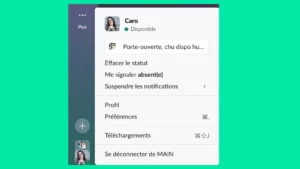
when we have a small gap in our calendar, we are invited to activate the friendly "door open, chu available, call me!" status. visible to all other users, this status creates spontaneous micro-conversations and sometimes makes it possible to quickly validate details on current projects without having to schedule ANOTHER meeting.
10- create channels or include social apps, you won't hesitate
we have a channel specifically for people who love the Wordle game. we also use apps built into Slack to bring in other ways to connect. for example, we use theDonut app that matches two people together every two weeks, randomly, inviting them to meet for 15-30 minutes to chat about non-work topics of their choice. for people lacking inspiration, the app even offers icebreaker questions if needed.
thePolly app lets you propose polls, anonymous or not, to the team. any member can create a poll. so, whether you want to know "Which of these choices best reflects your regular use of Zoom (on a weekly basis)?" or "What's the best way to prepare a Kraft Dinner?" Polly's here for you.
And what unique ways of using Slack in your organization would you like to share with us? We're listening!
- Caroline Cloutier